A universe of independent ideas

Think freely.
Build boldly.
Make it yours.

From your first line of code to your next big idea. Discover desktop tools, local AI and open research designed to help you get somewhere.

Desktop toolsPublic sourcePractical guides
SOFTWARE / IDEAS / EXPLORATIONOfficial downloads ↗Explore the source ↗Try a free browser tool ↗

Inside TalkToAi Code

An idea deserves
room to grow.

Open a project. Explore its files. Turn a task into a conversation, then review the work in one desktop workspace.

01

Start with the project

Local tools inspect files and create starters without a model or API key.

02

Choose your AI route

Connect a supported local runtime, your server or an optional provider API.

03

Keep a result you can review

Work with files, conversations and readable exports.

Take a closer look at Code →
TALKTOAI CODE / WORKSPACEExplore ↗
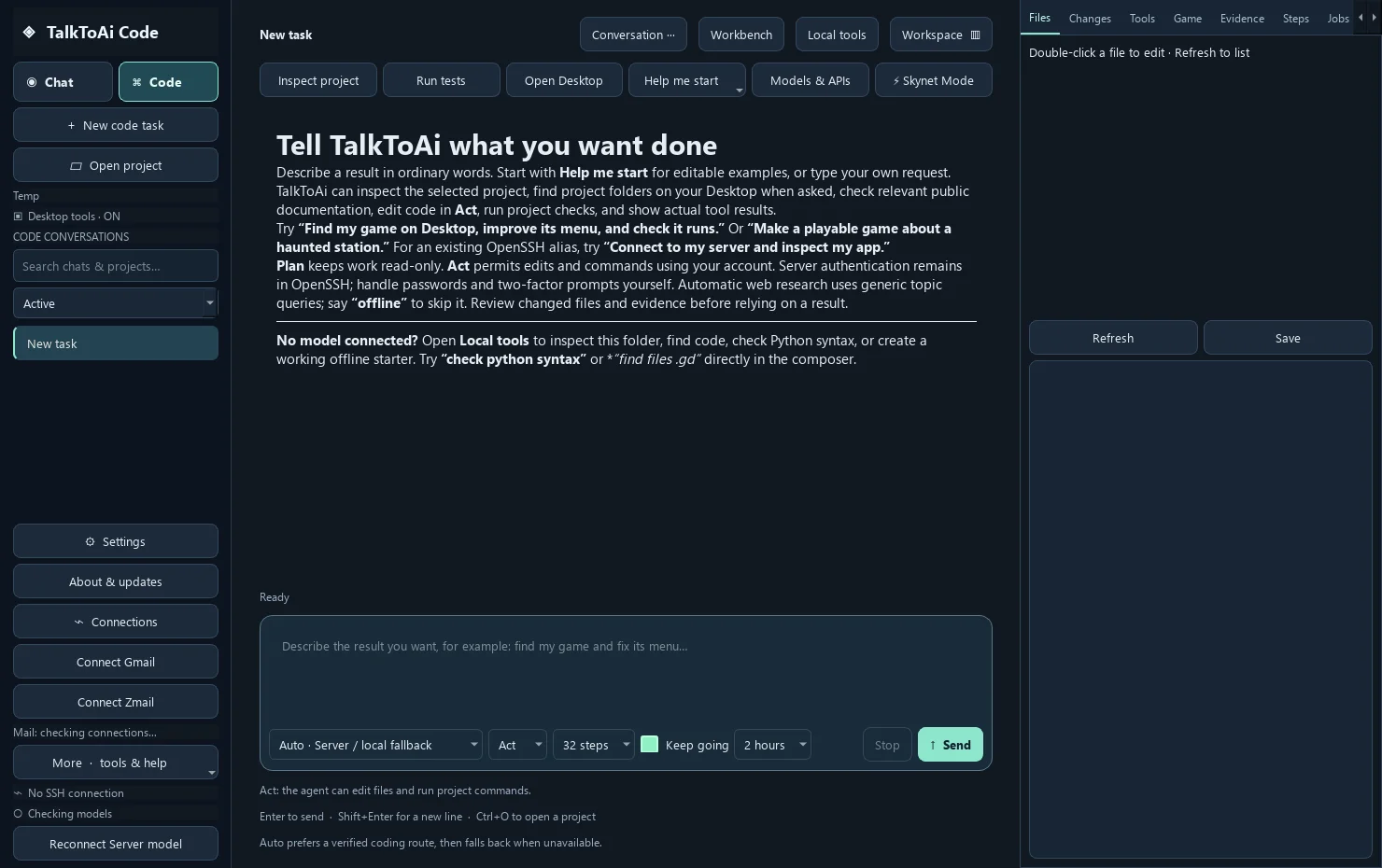
TalkToAi Code desktop workspace with project tools, conversation input and file panel
Desktop workspace screenshot. Features and available releases are described on the product page.

The research room

Good questions open new doors.

Explore independent research themes, public source and a practical path from an idea to evidence someone else can inspect.

Enter the research briefing ↗

The project collection

Find a tool that fits.

Start with a product guide, then choose its official app listing or public source. Model features use the route you configure.

Desktop assistant · project work

TalkToAi Code

A workspace for coding, conversation and creative projects. Inspect a folder with local tools, then connect your own AI route for custom work.

  • Local project checks without an API key
  • Files, conversations and readable exports
  • Local, self-hosted or optional provider APIs
Notes · desktop workspace

ZERO ONE

Keep encrypted notes on your device and bring your configured AI and selected desktop tools into one workspace.

  • On-device ZNotes
  • Optional AI and bounded Browser Pilot
  • Selected-folder security checks
Linux · self-hosted source

OpenZero

Run an AI node on a machine you control. A local model runtime, operator panel and compatible API give builders a starting point.

  • Your own runtime and hardware
  • Linux-first setup documentation
  • Optional tools and model routes
Windows · security tools

ZSEC Antivirus & Browser

Explore the Windows products and Community source. Understand what local scanning, quarantine and browser shields cover.

  • Official Microsoft Store routes
  • Companion security and local checks
  • Source with explicit engineering boundaries
Windows · standalone game

ZERO Ouroboros

A strategy and exploration game with progress stored on your device. Find its official listing, requirements and privacy information.

  • Standalone Windows game
  • On-device progress
  • No TalkToAI web account needed
Papers · public work

Research & models

Follow the public research repository and model catalogue. Read the methods, limitations and licenses alongside the work.

  • Papers and working notes
  • Public model cards and files
  • Source-led exploration

A little guidance goes a long way

Learn it. Then use it.

Plain-language guides for the decisions that matter: where your model runs, which edition to install, and how to get unstuck.

GUIDE / 01

Local model, your server, or API?

Compare setup, costs and where your task context goes before choosing a route.

Choose your AI setup →
GUIDE / 02

Get a local model working

Check the runtime first, connect the app, then try a short task. Troubleshoot each step.

Follow the local AI guide →

Browse all guides →

A useful tool. Right here.

A better brief makes a better starting point.

Turn your goal, context and constraints into a structured task brief for coding, writing, research or planning.

Your inputs stay in this page. There is no model call, account or upload. Copy the result into your chosen tool when you are ready.

Build a task brief →

Free to use · no sign-in · download as text

Start small. Keep the useful result.

From idea to a first step.

You do not have to configure everything at once. Choose one outcome and follow its shortest useful path.

Build

Understand a project

Open a folder in TalkToAi Code and try Local tools → Project quick check. For a custom change, connect a model and review the resulting files.

Try the first-run workflow →
Organise

Make your first note

Open ZNotes in ZERO ONE and create a note on your device. Configure AI separately when you want model-assisted work.

Start with ZERO ONE →
Explore

Read before running

Choose a repository, read its README and license, then follow its current setup instructions. Keep changes in a project you can review.

Open the builder directory →

Before you start

A few helpful answers.

More setup questions? The support directory connects each product to its guide and issue tracker.

Do I need a TalkToAI website account?

You can browse this site, read the guides and use the task-brief builder without an account. Desktop apps, provider APIs and Microsoft Store downloads have their own setup requirements.

Is everything free?

This website and its guides are free to browse. Public source is governed by each repository's license. Store listings set their own app terms, while optional API providers can charge for usage. Local models use your hardware, storage and electricity.

Can I use a desktop app without an AI subscription?

TalkToAi Code's documented Local tools can inspect projects without a model or API key. ZERO ONE has on-device ZNotes. AI work needs a supported model route: local runtime, your own server or an optional API account.

Where do my prompts and files go?

It depends on your configured route and enabled tools. Local inference sends model requests to your local runtime; a remote server or API receives the task context you send to it. Web and mail tools can also use the network. Read the app's privacy notice and check your selected route.

Does the website announce the latest installed app version?

Product pages identify dated, verified publication information. Microsoft Store and GitHub have separate release channels; follow the official links for available packages. Updating this website does not update an installed app.

What happened to the older hosted services?

This site now focuses on desktop software, public source and useful documentation. The retired hosted chat, DNA and mailbox services are not offered here. Use the current product pages and source links for supported routes.